Traditional SDLC
You will see below how traditionally the software development lifecycle (SDLC) works and how cloud changes the way we build, deploy and manage applications.
Clone a respository
Section titled “Clone a respository”- You can use this template to create your own project repository. Click
Use this templateandCreate a new repository. Provide a name for your repositoryspring-rest-api. You will have a copy of this code in your own github account
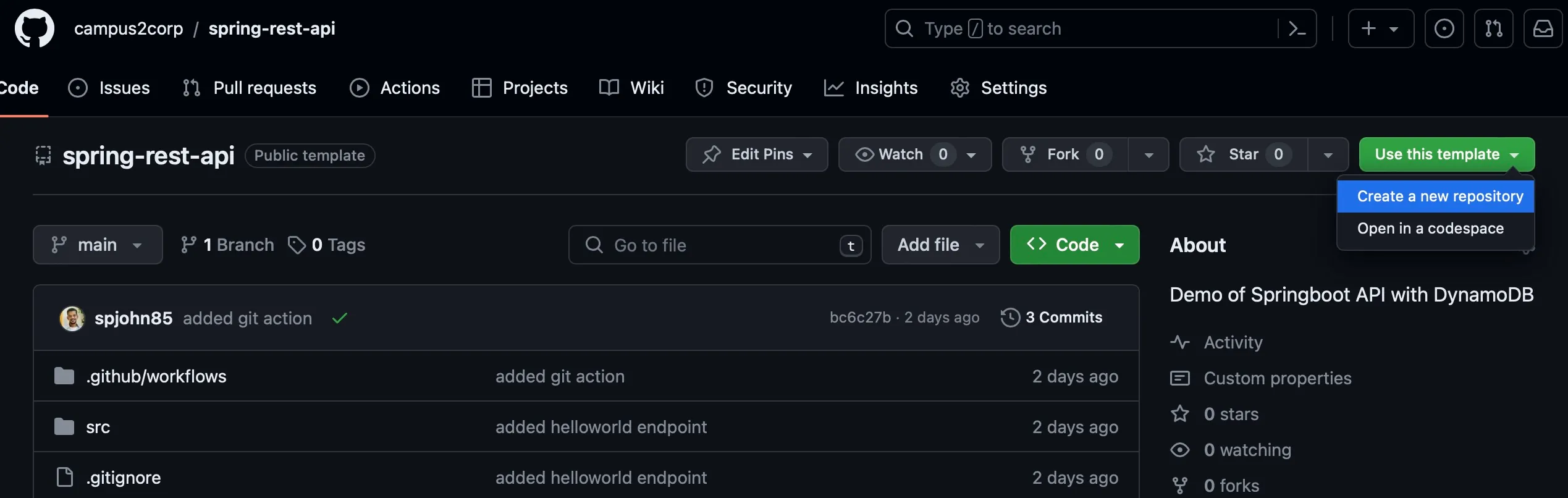
- Copy the URL next on dropdown
Code. Login to your AWS Account and Click Shell icon on top right. Goto AWS Cloud Shell and issue this command in shell
git clone $COPIED_URL- You have the copy of your code in your local shell. Check with command,
ls spring-rest-apiOutput
[cloudshell-user@ip-10-132-56-180]$ ls spring-rest-apicommands.sh Dockerfile mvnw mvnw.cmd pom.xml src targetInstalling JDK17 and Maven
Section titled “Installing JDK17 and Maven”Since this is a demo of how to run Java project, you need to install the following tools in Cloud Shell,
sudo yum install java-17-amazon-corretto-develjava -versionOutput
[cloudshell-user@ip-10-132-56-180 spring-rest-api]$ java -versionopenjdk version "17.0.9" 2023-10-17 LTSOpenJDK Runtime Environment Corretto-17.0.9.8.1 (build 17.0.9+8-LTS)OpenJDK 64-Bit Server VM Corretto-17.0.9.8.1 (build 17.0.9+8-LTS, mixed mode, sharing)sudo wget https://dlcdn.apache.org/maven/maven-3/3.9.6/binaries/apache-maven-3.9.6-bin.tar.gztar xzvf apache-maven-3.9.6-bin.tar.gzsudo ln -s ~/apache-maven-3.9.6/bin/mvn /usr/local/bin/mvnmvn -vOutput
[cloudshell-user@ip-10-132-56-180 spring-rest-api]$ mvn -vApache Maven 3.9.6 (bc0240f3c744dd6b6ec2920b3cd08dcc295161ae)Maven home: /home/cloudshell-user/apache-maven-3.9.6Java version: 17.0.9, vendor: Amazon.com Inc., runtime: /usr/lib/jvm/java-17-amazon-corretto.x86_64Default locale: en_US, platform encoding: UTF-8OS name: "linux", version: "6.1.66-91.160.amzn2023.x86_64", arch: "amd64", family: "unix"Compile and run
Section titled “Compile and run”Inorder to compile this program and create an executable jar. Issue the below command,
mvn clean installTo test the application run the following command,
java -jar target/dynamo-1.0.0.jarcurl http://localhost:8080/helloYou should see the output as below
Hello World